
Image Formats#
In paidiverpy, you can work with a wide range of image formats, including standard image files and raw formats commonly used in scientific imaging or digital photography.
Supported Image Formats#
The following types of image formats are supported:
OpenCV-compatible formats (loaded using cv2.imread):
bmp,dib– Windows Bitmapjpg,jpeg,jpe– JPEGjp2– JPEG 2000png– Portable Network Graphicswebp– WebPpbm,pgm,ppm,pxm,pnm– Portable image formatssr,ras– Sun Rastertiff,tif– TIFFexr– OpenEXRhdr,pic– Radiance HDR
RawPy-compatible formats (loaded using rawpy): RawPy Documentation
crw,cr2,cr3– Canon RAWdng– Adobe Digital Negativenef,nrw– Nikon RAWorf– Olympus RAWrw2– Panasonic RAWraf– Fujifilm RAW
Manually specified raw formats (custom loaders)
If your image format is not supported by OpenCV or RawPy, you can still load it by manually specifying its properties such as dimensions, bit depth, color layout, and endianness.
How Image Loading Works#
By default, paidiverpy automatically selects the appropriate image loading method based on the file extension and user configuration. There are three strategies depending on the image format:
OpenCV-compatible images These are loaded using cv2.imread and require no special parameters. You can simply define:
"image_open_args": "png"
You can also specify the format to “”, which will load the image using the default OpenCV method. You can refer to OpenCV Image Formats for more details.
RawPy-compatible images These are loaded using the rawpy library and require additional configuration for postprocessing. For example:
"image_open_args": {
    "image_type": "nef",
    "params": {
        "use_camera_wb": true
    }
}
The parameters in
paramswill be passed directly to rawpy.RawPy.postprocess(). You can refer to the full documentation here: https://letmaik.github.io/rawpy/api/rawpy.RawPy.html. In the example above, the use_camera_wb parameter is set to true, which means that the camera’s white balance will be used for postprocessing. This is useful when you want to preserve the original colors of the image as captured by the camera.Manually loaded raw images When the image format is unknown or unsupported by existing libraries, you must specify metadata such as width, height, bit depth, and layout.
Example configuration:
"image_open_args": {
    "image_type": "raw",
    "params": {
        "width": 2448,
        "height": 2048,
        "bit_depth": 8,
        "endianness": null,
        "swap_bytes": false,
        "layout": null,
        "image_misc": "bayer",
        "bayer_pattern": "GB",
        "file_header_size": 0
    }
}
These parameters are inspired by the settings found in IrfanView. This is a screenshot of the available options in IrfanView:
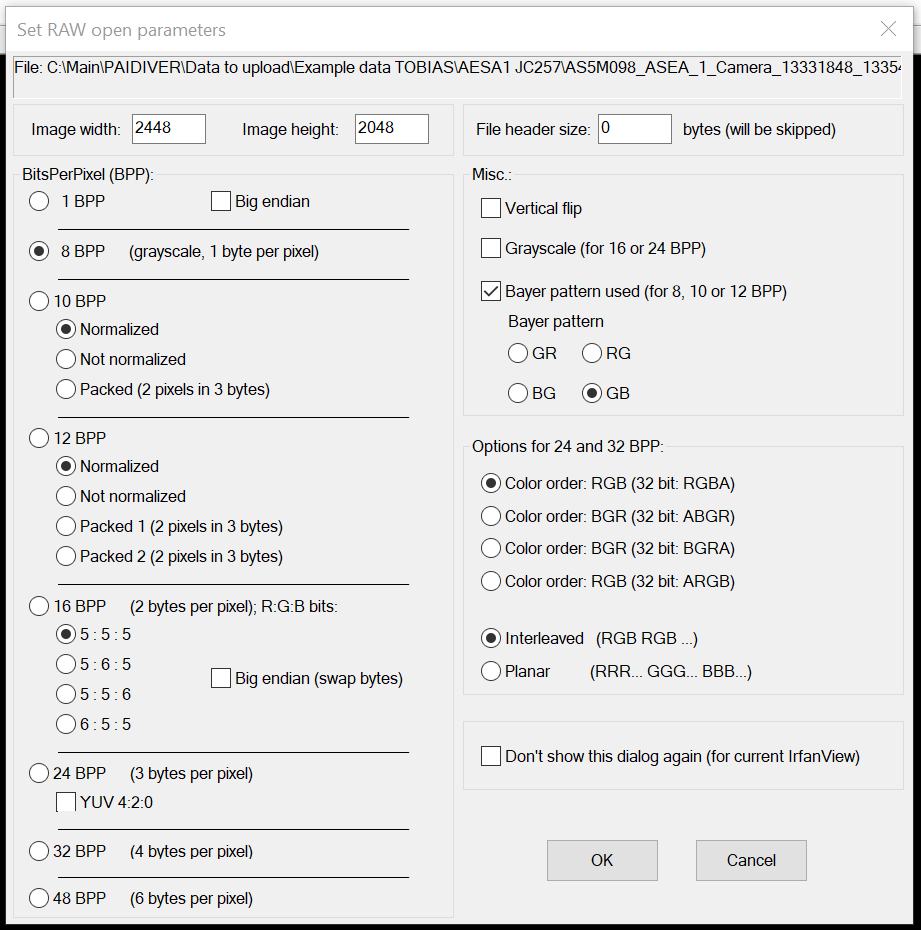
Now the package supports loading raw images only in 8 BPP and 16 BPP formats. The following parameters are available:
width: Image width in pixels.
height: Image height in pixels.
bit_depth: Bit depth of the image (8 or 16).
endianness: Endianness of the image data (little or big). Only applicable for 16 BPP images. It can be set to:
null, if not needed.
little, if the data is in little-endian format.
big, if the data is in big-endian format. In this case, the data will be swapped.
layout: Layout of the image data. Only applicable for 16 BPP images. It can be set to:
null, if not needed.
5:6:5, if the data is in RGB565 format.
5:5:5, if the data is in RGB555 format.
6:5:5, if the data is in RGB666 format.
5:6:5, if the data is in RGB666 format.
5:5:6, if the data is in RGB666 format.
image_misc: Image miscellaneous information. It is a list of strings, separated by comma. It can be set to:
bayer, if the data is in Bayer format.
vertical_flip, if the data need to be flipped vertically.
bayer_pattern: Bayer pattern used in the image (e.g., GB, RG, etc-. Only applicable for 8 BPP images and if bayer is in image_misc. It can be set to:
GB, if the data is in GB pattern.
RG, if the data is in RG pattern.
BG, if the data is in BG pattern.
GR, if the data is in GR pattern.
file_header_size: Size of the file header in bytes to skip.
Other params and raw formats are not supported yet. If you need to load a specific format, please open an issue in the paidiverpy repository.
Tips and Recommendations#
If you’re unsure which parameters are needed, start with a small test set and minimal configuration.
The system will attempt to auto-detect the loading method when possible, but explicitly defining image_open_args ensures consistent results.
For detailed usage examples, refer to the relevant Jupyter notebooks under the gallery examples.
For details on the configuration file format, refer to the Configuration File section.